Saturday, November 28, 2009

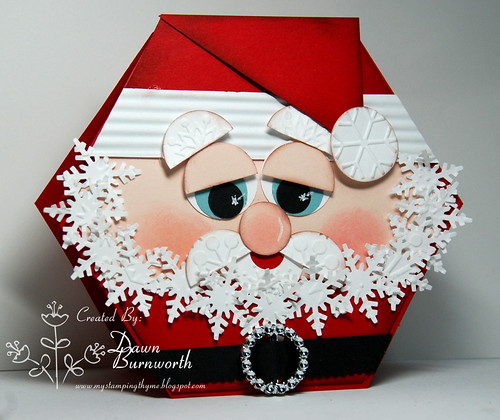
Punched Santa


I am still on automatic post today.. I am sadly driving my daughter's back to IL today.  My niece and sister flew back last night..  I miss them already.

This was created for Saturday Spotlight Challenge #9.  Create a card in the shape of a hat, an image with a hat or something to do with hats.  Santa has a hat right???  This is my second Santa card but this time I used a hexagon shape. 

Also counts for Crazy 4 Challenges this week.. Punch Happy.  I used many punches on this card..
Here is my ornament from last week.  This was so easy.  It is a digital sentiment that I printed onto fabric then I cut out using nesties.  I stitched around the edges and then stuffed it a bit and finished stitching it up.. The sentiment is from The Cutting Cafe.

 

SSH08DawnB.

Thursday, November 26, 2009

Mo's Digital Challenge and Merging Tutorial

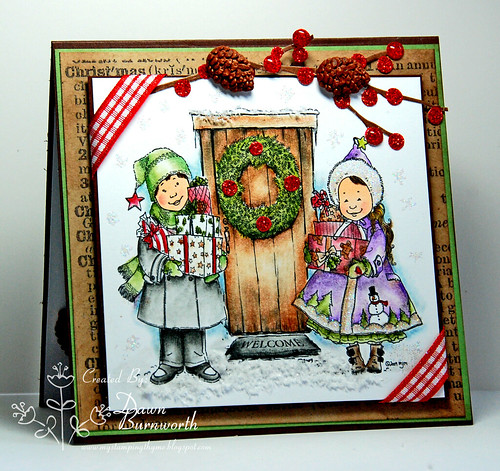
Noelle

This week Caryn challenged the team to create a Christmas card using more than one
image.. These images are perfect for the holidays.. I chose Noelle and Nicholas with this
awesome door.. I colored with Prisma pencils and added some glitter, flower soft and ribbon.. The pinecones and berries I got from Mikes. The Christmas definition page is from Mel Stampz. 

MERGING IMAGES
I have a quick tutorial for you on how to merge images in Photoshop Elements 7.  Thanks so much to my DT friend Sheila and my friend Holly Young for helping me out.. I have also added a link at the bottom for an awesome video tutorial Holly created.  We both do it differently but you get the same effect.

Download your Images in your usual manner and save to your computer. 
Open Adobe Photoshop Elements 7
       *On the top right hand side you will see the words ORGANIZE FIX CREATE SHARE
         click on FIX.  If you go down the menu you will see FULL EDIT.. That is where you
         need to be..

We will now create a new blank file.
        *Go to File (at the top) then NEW...then Blank File
        * Name your new file
                Set Width and Height to 5in X 5in
                 Resolution should be set to 300 pixels

You should now have a white and grey checked square box.  This is your new page.

Now we will open our files that we want to merge.. Go to File then click on OPEN and open the Mo files you have previously saved to your computer.. I used Nicholas and Noelle.  Each image and the blank file will be displayed at the bottom of your screen and on the right side.. Each image and your new box is its own layer.  This is important to know..

Double click on the empty box to open it up.. Now place your cursor on Noelle and drag her up to the open box (from below).  Do the same with Nicholas.  They will be small. 
Now we will resize.. Each image is its own layer.  You need to go to the right and click on the image you want to work on and that will bring it the active image. 

You should see dotted lines and boxes around each image.. Drag those out and up to resize.  Now click the green arrow at the top and it should remain that size.


Now go to the right and click on Noelle.. She is now live and you should be able to resize her..

OVERLAPPING and ERASING images:
You can move your images and then erase the parts you don't want.. The image you want to erase needs to be your active image.. Then you can just go to the left tool bar and use the pink eraser button to erase.. Do it in small pieces so in case you make a mistake you don't have to redo the entire image.  I added my door first and then put Noelle and Nicholas on top. 

   When you click on the Eraser tool a circle will appear.  Use your cursor and drag it around the area you want to erase.  If you let up on the mouse a few times it will save it in sections.. That way if you make a mistake in one small section you can go to the top tool bar to Edit and click undo and that small section will be undone.. Otherwise it will undo the entire erased function. 

Once you get them all edited you will need to merge your layers. 
      Go to Layer...merge visible..
       Now go to File and save as your new image..

My friend Holly Young has a video tutorial here also... She helped me so much and hers is a bit different and a little easier. 

Holly Young's Tutorial

I am away from my computer and this is an automatic post.. If you have any questions just let me know.. This is the way that I create but there are many ways to do it...I have been playing around with the free software program GIMP hoping to get it figured out for doing the merging also.. so stay tuned.


Thursday, November 19, 2009

Family Time


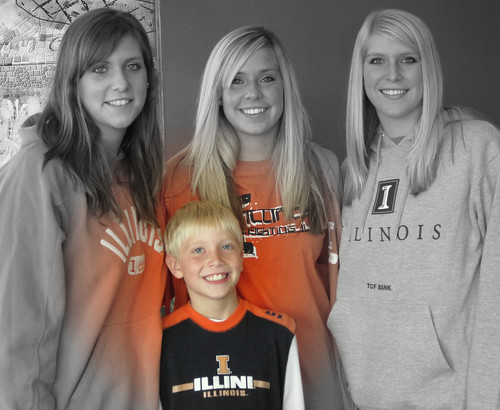
I am taking a short break from stamping and spending time with these lovely children.. My girls are all here for the holiday.. We will laugh, love and live in these precious moments.
Can you tell my son is spoiled rotten?

My sister recently sent this prayer to me and it really meant alot.. I don't get to see her often as we live 5 states apart but she is always there for me..

Dear Lord,
There are so many wonderful people I love and I ask Your  forgiveness and theirs-for not
letting them know all the times that I could how they're kept in my thoughts and prayers.

How the things that can seem so important each day really mean nothing at all
compared to the warmth and blessings we share in a visit, a letter, or a call. 

So please help me to remember there'll always be time to accomplish the things I must do, but the memories we make with the ones we love are the treasures that last

all life through....Emily Matthews.

Have a blessed holiday and spend lots of time with the ones you treasure..

Mo's Digital Challenge

Mo'sChallenge1118

It's Thursday and time for another challenge over at Mo's.. This adorable image is a new release called "Coexist".. Not only does Mo create beautiful images but I just love the way she names them too..


Caryn's challenge for this week is a recipe: 3 different papers, 2 ribbons and 1 border punch.. I colored mine with Copics and Prisma Pencils.  The paper I used is from Die Cuts With A View.   Kind of a funky layout but it works with this image..

I am also adding this to the Ways To Use It Challenge on SCS.. It is a "thankful" theme.. I find this image so wonderful because it is a portrait of what we all are to each other.. You taking the time to come here to my blog and leave me a comment each week means so much.   We are all different but the one thing that "piles" us all together is our creativity.. Thank you so much for visiting me...

 Come join the fun. Mo's Challenge Blog

Tuesday, November 17, 2009

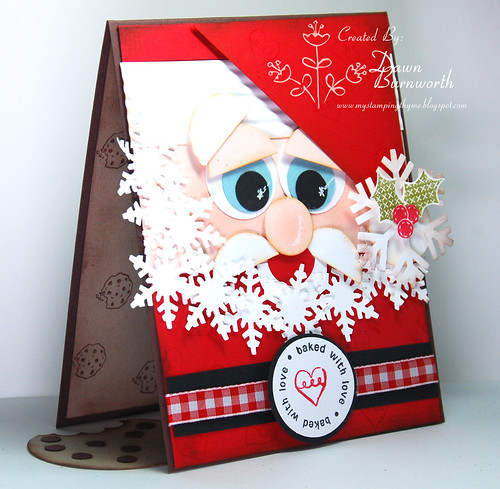
Faux Cookies From Santa


I created this card for the Color Challenge hosted by Betty on SCS.. We were to use Red,
Green and Browns.. I had been working on this card for my daughter.. I wanted to use
the newly released set Baked for You Tags from Clear Dollar Stamps.. Santa's belt buckle
and the cookies on the inside are from this  new set.. I also used the Holiday Patterns for the holly
berry leaves..  The large snowflake on his hat is from my sweet DT friend Lisa..

My daughter is on a diet and I wanted to send her some sweet loving.. The inside has a faux 
cookie.. No calories but lots of love..


Have a wonderful day...


Saturday, November 14, 2009

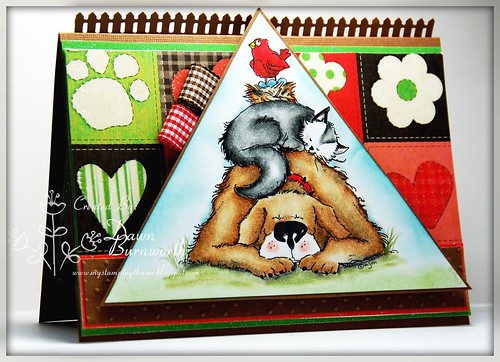
Wrinkles


It's Saturday Spotlight with Hidden Potential time... This week Vicki challenged us to create a masterboard.. What is that you ask.  It is basically using images whether they be stamped or digi images to create your own designer paper.  I used an old dog print stamp I have had forever.. Stamped it in black then colored over it with copics.  Added hearts in red.. This adorable image is from Digital Ink Co. called Wrinkles The Bulldog.. Digital Ink Co is the sponsor for this week's challenge.. All you have to do is created a masterboard (your own Designer Paper) and show us your creation for a chance to win.. 

Thursday, November 12, 2009

Sam's In Trouble


This week for Mo's Challenge we are to create a card based on a sketch.. I used Sam's In Trouble and Honey for my image.  Merged the two in Photoshop.  Colored with prisma pencils and copics..

The photo corners are a sweet RAK from my friend Lisa.. She sent me so many goodies.. What would we do without great friends.. This is a Martha Stewart punch and I love it..


Create a card based on the sketch and add it to Mr Linky for a chance to win.. This week you could win a chance to send Mo a one liner and she will create an image and you get to name it.. 

Have a super day.. Ida is still causing major weather here in North Carolina.


Tuesday, November 10, 2009

Squigglefly and an RAK


I recently won a few images from Squigglefly.. I love their images. These are
digis and they are so easy to download and resize. I used my new RAK punch my sweet friend Lisa sent to me.. She is the queen of RAK's as there were so many goodies in my box..I am blessed to call her friend. 
I used prisma pencils and copics this one.. I created it for several challenges..

Squigglefly:  Sketch Challenge
Our Creative Corner:   Picture Inspiration
Digital TuesdayCreate A Holiday Card..I kind of cheated but I think Thanksgiving is a holiday..hehe.


This second card uses another Squigglefly image.. I thought it was perfect for Thanksgiving.  My oranges turned red when I edited it.. Sorry about that.. It is a dark
gloomy day here. 


This is another RAK from my sweet friend Nikki.. It also is a digi image.
We met up at a retreat in Florida and she gave this to me...I just love it..
It is a turkey baster and she added this adorable tag to it... Thanks Nikki. 
We had the best time. Lots of laughs and little sleep..


Hope you have a terrific day.. Thanks so much for dropping by..


I hate it when blogger does this...my comment section is down a bit.. Hope you have a great
day and thanks for visiting...


Sunday, November 8, 2009

Banana Split Sunday


Today is Banana Split Sunday.  The challenge this week is to create a card from this recipe...One oval, 2 ribbons and 3 eyelets.. This sweet image is available at the 2Redbanana store.  Come join the fun.  

Saturday, November 7, 2009

Saturday Spotlight With Hidden Potential Challenge


It's time for another Saturday Spotlight Challenge.  This week Vicki challenged the DT to use a stamp more than one time on our card.  I chose this adorable HM stamp from 2RedBananas store.. It is my favorite.  I used my strawberry stamp from Fire Cracker Designs stamped it on Kraft and colored it all with Prisma Pencils.   The digi paper with words is from Mel Stampz.. I printed it also on Kraft.. Come join in the fun.. Create a card using an image more than once, add it to Mr. Linky and you could win..


Friday, November 6, 2009

Christmas RAK's


Clear Dollar Stamps is hosting a new Weekend Challenge called Clearly Inspired.  I created this card for the first challenge.  We were to use 5 of anything.. I used 5 squares.  Check it out.  There is a huge celebration going on for Clear Dollar Stamps 5th birthday.  This is a newly released set created by the fabulously talented Wendy Hall.  So grab your CDS stamps and come join the challenge to Give Me Five.
This first card is going as a RAK to a family back in my home town that have a daughter named Sydney.  She  is in her final days and they  are celebrating Christmas.   Here is their story:  Sydney Ives


This second card is for several challenges: 

High Hopes challenge this week is to create a card with a card with a snowflake.  My designer paper has snowflakes..

These both qualify for the Stampin B's challenge this week.. Hosted by Faith to make a Christmas card. Check out their fun challenge Blog.  The white paper I used on the HH card is from Mark's Finest Papers.  It is so awesome for copics.

This also qualifies for The Cute Daisey May challenge to create a BLUE Christmas card.

Then there is the LSC on Splitcoast.   Silvia challenged us to create a card for a sweet little boy named Noah that is battling cancer.  He is in his final days and his family is celebrating Christmas this week.    If you too would like to send a card you can read about Noah here:  Noah Biorkman


Have a terrific weekend and give your kids a hug...


Thursday, November 5, 2009

Mo's Digital Challenge #5


It's time for another challenge at Mo's challenge blog.  This week Caryn is our hostess and she has challenged us to create a card with sparkle.  We were to use 3 different sparkle elements on our card.  I chose to sparkle 3 different layers.  My main layer was an idea I got from Mel Stampz.  I downloaded her digi book page.  The second layer is done with the ultimate glue pad and my SU background stamp.  The third layer..Matilda and Honey are also glittered.  It is hard to photograph the glitter.  I colored my image with copics and hightlighted with prisma pencils.  I merged the two images with PSE.  I also created my own button out of Mel's paper and glitter the edges.  Lots of sponging.  Come join in on the fun.  Mo has many wonderful images.  Check them out HERE.  Then create a card with 3 sparkles and add it to Mr Linky for a chance to win. 

Also wanted to mention that the white paper I used here is from Mark's Finest Paper.  It is really great for coloring with copics..  I love the "feel".  Faith has great paper and some really super ribbon..


Monday, November 2, 2009

Happy Birthday Clear Dollar Stamps


It's Clear Dollar Stamps birthday.. Come join all the fun.. Here on Lori's Blog are all the
details..  There are lots of great prizes.

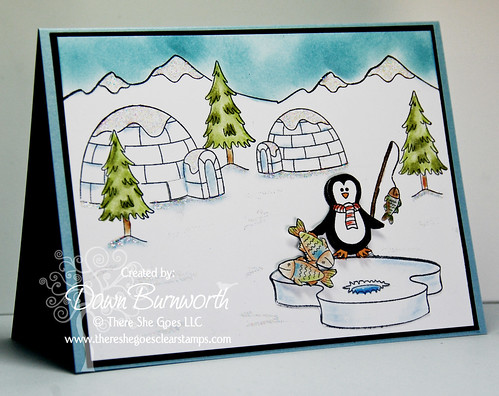
There She Goes Monday Challenge


Today's Monday challenge at There She Goes is hosted by ME...
You were to create a "scene".  I thought this newly released stamp set
was perfect for this challenge.  It is called Penguin Love.  So many
stamps and possibilities.. I am a bit under the weather today so this is
short and sweet.  Go check out the details, create a card and add it
to Mr. Linky for a chance to win.